Make a postcard
Just listed, just sold, open house, farm or holiday postcards.
About 3 minutes · 3 steps
Step 1: Ask for a postcard with the facts
Click Create content and type “postcard” with what it’s for and the details. Attach a photo of the home with the paperclip if you have one.
Type something like thisMake a just-listed postcard for 864 Eagle Drive, Four Seasons. $649,000, 4 bed, 3 bath, 2,900 sq ft, lake view, 2-well dock. Open house Saturday 1 to 3.
Step 2: Change anything you like
Type changes in the same chat: “Put the price in bigger letters” or “Use the second photo instead.”
Step 3: Mail it or print it
Click Mail this to have Brand Launch print and mail it to your list ($1.49 a card), or Download PDF to print it yourself. See Mail postcards for you.
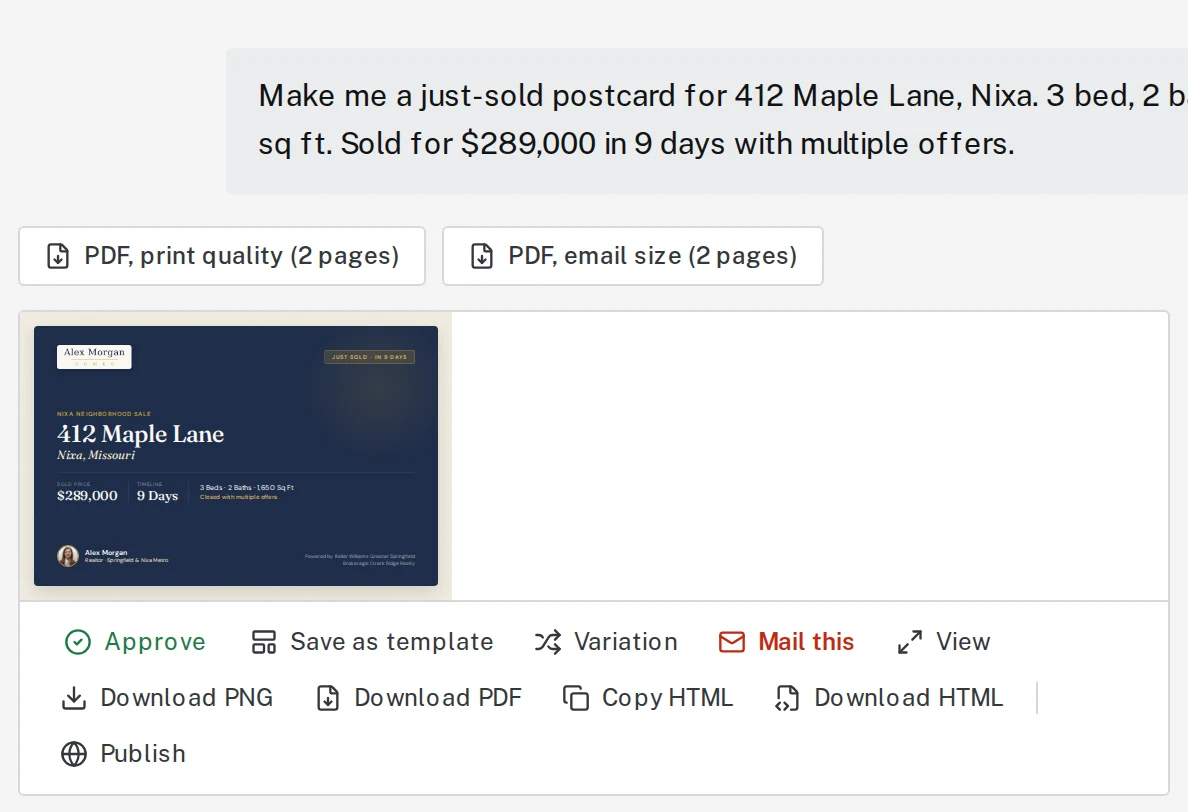
Tap the picture to see it bigger
Next, try
- Mail postcards or letters for youUpload your list, and Brand Launch prints and mails them. $1.49 a postcard, $1.99 a letter.
- Make a Listing KitPaste one listing link and get posts, a story, a flyer, postcards and captions for it.
- Add a QR codePut a QR code on a flyer or postcard that opens your listing, website or calendar.
Still stuck?
Send an email and tell us what you were trying to do. A screenshot helps, but it's not required. A real person will write back.
Email john@brandlaunch.vip